
DOMEIXA® Blog • Domain Acquisition & Secure Transfer
How to Transfer a .COM Domain After a Sale
A complete guide to changing the registrant, moving a domain between registrar accounts and completing an inter-registrar transfer through FORPSI, GoDaddy or Dynadot.
Core Principle
Payment, ownership change and registrar transfer are separate steps that must be coordinated in the correct order.
Quick answer: what happens after a .COM domain is sold?
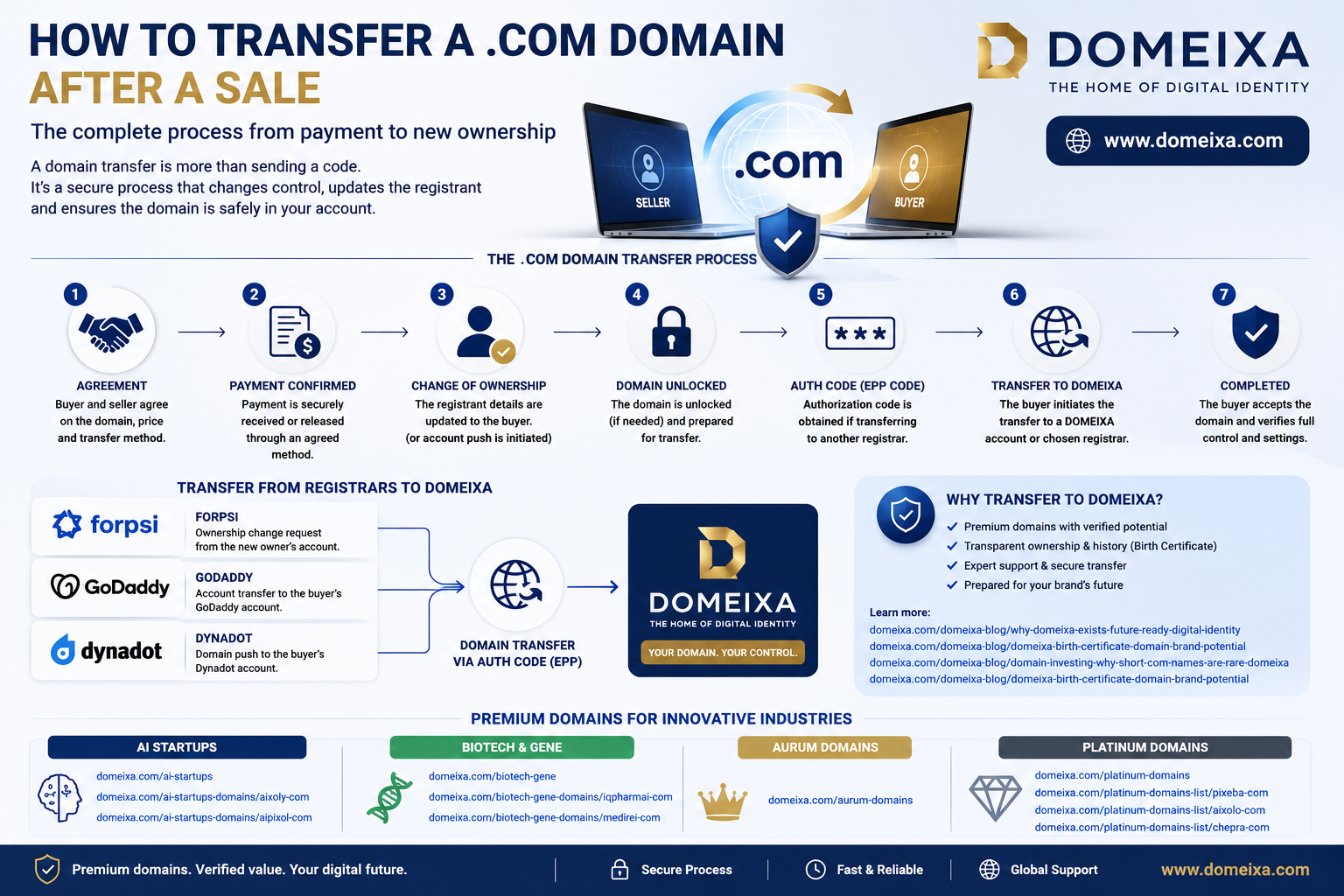
After payment has been securely confirmed, the seller transfers administrative control of the domain to the buyer. The fastest method is usually an internal account transfer when both parties use the same registrar. If the buyer wants to use a different registrar, the domain must be unlocked, an authorization code must be obtained and the buyer initiates an inter-registrar transfer. The registrant details are then updated to identify the buyer as the new registered holder.
Three different actions that are often called a “domain transfer”
In everyday language, buyers and sellers often use the word “transfer” for several technically different operations. Understanding the distinction is essential because each operation has different approval steps, time limits and security implications.
| Operation | What Changes? | Registrar Changes? | Typical Use |
|---|---|---|---|
| Change of registrant | The registered owner’s name, organization or email | No | A domain is sold while remaining with the same registrar |
| Internal account transfer | Control moves from the seller’s registrar account to the buyer’s account | No | Fast transfer between two accounts at FORPSI, GoDaddy or Dynadot |
| Inter-registrar transfer | Domain management moves to another registrar | Yes | The buyer wants to manage the domain with a different provider |
ICANN distinguishes between an inter-registrar transfer and a change of registrant. Under the current Transfer Policy, the registered name holder is the party authorized to approve or deny a transfer to another registrar. A material change to the registrant’s name, organization or email address is treated as a change of registrant. :contentReference[oaicite:0]{index=0}
The DOMEIXA® sale and transfer procedure
DOMEIXA treats the domain, the purchase transaction and the technical transfer as three connected but separate stages. The domain remains under the seller’s control until the agreed purchase price has been confirmed as received or released through an agreed secure payment arrangement.
Acquisition inquiry
The buyer contacts DOMEIXA, confirms the selected domain and requests the purchase conditions, invoicing details and available transfer method.
Buyer and billing verification
The buyer supplies the correct personal or company details that will appear on the invoice and, where relevant, in the new registrant record.
Selection of the transfer route
The buyer chooses either an internal transfer at the current registrar or an inter-registrar transfer to another provider. An internal transfer is normally faster and reduces the number of technical steps.
Payment confirmation
DOMEIXA initiates the ownership transfer only after the purchase price has been confirmed. An authorization code or account push is not released merely on the basis of an unpaid order or informal promise.
Registrar preparation
The domain’s expiry date, lock status, registrant contact, pending changes and DNS configuration are checked before the transfer is started.
Buyer acceptance
The buyer accepts the incoming domain through the registrar account, email confirmation or transfer interface within the applicable deadline.
Final ownership verification
After completion, both parties verify the registrar account, registrant information, domain status, expiry date, nameservers and access security.
The fastest option: transfer within the same registrar
If the buyer is willing to keep the domain temporarily or permanently at its current registrar, DOMEIXA can normally use an internal account transfer. This avoids the standard EPP authorization-code process and does not change the registrar of record.
Recommended DOMEIXA Route
Internal account transfer first, registrar migration later
When speed and transaction security are the priorities, the buyer can create an account with the registrar where the domain is currently held. DOMEIXA transfers the domain into that account and completes the registrant change.
After the buyer has full control, the buyer may keep the domain at that registrar or move it later, subject to transfer locks and registrar policies.
Why this method is efficient
- fewer approval stages,
- no transfer authorization code,
- usually faster completion,
- lower risk of transfer rejection,
- easier DNS continuity,
- clear account-level control.
Registrar Procedure 01
Changing the owner of a .COM domain at FORPSI
For generic domains such as .COM, FORPSI requires the ownership-change request to be submitted as an authorized request from the new owner’s customer administration. The domain must already be listed in the new owner’s administration, so the buyer must first create a FORPSI customer account and the service must be moved into that administration. :contentReference[oaicite:1]{index=1}
Practical FORPSI sequence
- The buyer creates a FORPSI customer account.
- The domain is moved into the buyer’s customer administration.
- The new owner sends an authorized ownership-change request.
- The new owner receives and confirms the first approval message.
- The current owner receives and confirms the second approval message.
- FORPSI completes the ownership change and confirms the result.
Important FORPSI details
- The ownership change is free.
- The domain is not renewed during the change.
- Both owners must confirm.
- The request is valid for seven days.
- WHOIS data is normally updated within approximately 24 hours after both confirmations.
FORPSI distinguishes this ownership-change process from a registrar transfer. Moving a generic domain to another registrar requires the domain to be unlocked and an AUTH ID or authorization code to be obtained for the gaining registrar. :contentReference[oaicite:2]{index=2}
Registrar Procedure 02
Transferring a domain to another GoDaddy account
A GoDaddy account transfer moves the domain from the seller’s GoDaddy account directly into the buyer’s GoDaddy account. The buyer provides the email address associated with the receiving account and may also provide the GoDaddy customer number. The seller then starts the account-transfer request from the domain settings. :contentReference[oaicite:3]{index=3}
| Step | Seller Action | Buyer Action |
|---|---|---|
| 1 | Open the Domain Portfolio and select the domain | Create or verify the receiving GoDaddy account |
| 2 | Select “Transfer to another GoDaddy account” | Provide the correct account email and optional customer number |
| 3 | Choose whether eligible contact information should be copied | Check the incoming transfer notification |
| 4 | Complete identity verification when required | Accept the domain within ten days |
GoDaddy states that an account transfer is not available when the domain has a pending contact-update approval, is within one day of expiry, has expired or is already involved in another transfer. The receiving party must accept the transfer within ten days or the request expires. :contentReference[oaicite:4]{index=4}
GoDaddy keeps the domain’s existing DNS settings during an account transfer, but connected products such as website hosting or email do not transfer with the domain. The buyer must therefore arrange separate access or migration for any external services. :contentReference[oaicite:5]{index=5}
Registrar Procedure 03
Changing ownership through a Dynadot domain push
Dynadot calls an internal account move a “Change Ownership Request” or domain push. It is different from a registrar transfer, is offered free of charge and moves the domain from one Dynadot account to another. :contentReference[oaicite:6]{index=6}
What DOMEIXA needs from the buyer
- a valid Dynadot account,
- the buyer’s Dynadot Push Username,
- confirmation of the correct recipient identity,
- instructions on whether current DNS settings should remain active.
What DOMEIXA completes
- unlock the domain,
- select “Change Account”,
- enter the recipient’s Push Username,
- select “Keep current DNS settings” when required,
- submit the push and request buyer acceptance.
The recipient must accept the incoming move. Dynadot states that the push request expires after approximately one week if the recipient does not respond. Custom DNS settings are not retained automatically unless the seller selects the option to keep the current DNS settings. :contentReference[oaicite:7]{index=7}
When the buyer wants a different registrar
An inter-registrar transfer is used when a domain is held at FORPSI, GoDaddy or Dynadot but the buyer wants it moved to another ICANN-accredited registrar. The buyer starts the transfer with the new registrar, while DOMEIXA prepares and authorizes the domain at the existing registrar.
Check transfer eligibility
The domain must not be blocked by a registry or registrar lock, recent registration, recent registrar transfer, dispute or other transfer restriction.
Unlock the domain
The transfer lock is removed only for the duration of the authorized transfer process.
Obtain the authorization code
DOMEIXA retrieves the domain-specific EPP, AUTH ID or transfer code from the current registrar after payment confirmation.
Buyer starts the transfer
The buyer enters the domain and authorization code at the gaining registrar and pays any applicable registrar-transfer fee.
Approve the transfer
The seller and buyer complete any approval emails or registrar-interface confirmations required by the losing and gaining registrars.
Verify completion
The buyer confirms that the domain appears in the new registrar account and that the registrant, nameserver and renewal settings are correct.
GoDaddy describes the standard outgoing-transfer preparation as unlocking the domain, removing or reducing protection settings where required and obtaining the authorization code. GoDaddy states that registrar transfers commonly take five to seven days, although approval can accelerate the process.
Dynadot similarly requires the domain to be unlocked and an authorization code obtained before the gaining registrar starts the transfer. It recommends beginning the transfer at least two weeks before expiry to reduce the risk of delay. :contentReference[oaicite:9]{index=9}
Critical Timing Rule
The 60-day transfer lock can determine the correct sequence
A .COM domain generally cannot be transferred to another registrar within 60 days after its initial registration or a previous inter-registrar transfer. A material change of registrant can also trigger a 60-day inter-registrar lock. Registrars may allow the prior registrant to opt out of that lock before the ownership change, but they are not required to offer this option. :contentReference[oaicite:10]{index=10}
For this reason, the buyer should decide before the ownership change whether the domain should remain at its current registrar or immediately move elsewhere. Changing the registrant first and only then requesting a registrar transfer can create an avoidable 60-day delay.
Recommended sequence in the most common situations
| Buyer’s Objective | Recommended Route | Why? |
|---|---|---|
| Keep the current registrar | Internal account transfer and registrant change | Fastest and simplest route |
| Take immediate control as quickly as possible | Create an account with the current registrar and accept an internal push | Avoids the EPP process and typical registrar-transfer delay |
| Move immediately to another registrar | Agree the transfer sequence before changing registrant data | Reduces the risk of a 60-day change-of-registrant lock |
| Domain is close to expiry | Renew first or use an internal transfer | Avoids expiry during the transfer process |
What happens to the website, email and DNS?
Ownership of the domain registration is separate from website hosting, email hosting, cloud services, SSL certificates and other connected products. Transferring the domain does not automatically transfer the website files, databases or mailboxes.
Domain registration includes
- control of the registered domain,
- registrar-account management,
- registrant contact data,
- renewal and transfer settings,
- nameserver configuration.
Usually transferred separately
- website source files,
- content-management systems,
- databases and applications,
- email accounts and historical mail,
- hosting subscriptions and licences.
GoDaddy explicitly states that DNS settings remain with an internal account transfer while connected products such as websites and email do not transfer. Dynadot requires the seller to select “Keep current DNS settings” when the existing custom DNS configuration should remain active during an account push. :contentReference[oaicite:11]{index=11}
DOMEIXA security checklist before releasing a domain
- purchase price confirmed as received,
- buyer identity and billing information checked,
- receiving registrar account verified,
- recipient email, customer number or Push Username verified,
- domain name and extension checked character by character,
- expiry date and renewal status reviewed.
- transfer lock and eligibility checked,
- pending registrar actions reviewed,
- DNS settings documented,
- authorization code shared only through an agreed secure channel,
- buyer acceptance monitored,
- final account and registrant record verified.
Myth versus Reality
Common misunderstandings about domain ownership transfers
“Sending the payment automatically changes the owner.”
No. Payment and the registrar’s ownership-change process are separate actions.
“An authorization code proves legal ownership.”
No. It authorizes a registrar transfer, but the transaction agreement and registrant records establish the ownership context.
“A domain transfer also moves the website.”
No. Hosting, databases and email services must be transferred or configured separately.
“Every transfer is completed immediately.”
No. Internal account pushes may be fast, while inter-registrar transfers can take several days and may be delayed by locks or missing approvals.
Domain ownership does not automatically create trademark rights
A completed registrar transfer gives the buyer control of the domain registration. It does not automatically grant exclusive trademark rights, company-name rights or permission to use a name in every industry and jurisdiction. Buyers should complete an independent trademark and legal-conflict review before launching a brand.
DOMEIXA therefore presents a domain as a digital identity and strategic naming asset, not as a guarantee that every possible commercial use is legally available. The broader branding methodology is explained in The DOMEIXA Birth Certificate: How We Reveal a Domain’s Brand Potential.
Examples from the DOMEIXA portfolio
DOMEIXA’s transfer process applies to compact brandable domains, specialized technology identities and larger digital domain ecosystems. The exact registrar procedure is confirmed individually before every transaction.
PIXEBA.COM
A compact visual and digital-media identity from the Platinum portfolio.
AIXOLO.COM
A global AI identity suitable for intelligent platforms and future-facing products.
CHEPRA.COM
A distinctive premium identity with broad corporate and international potential.
AIXOLY.COM
An adaptable identity for AI software, agents and intelligent automation.
AIPIXOL.COM
An AI and imaging identity for visual intelligence and creative technology.
IQPHARMAI.COM
A specialized identity combining pharmaceutical intelligence and artificial intelligence.
MEDIREI.COM
A healthcare and medical-technology identity with international scalability.
Explore additional curated identities for AI startups and biotechnology, medical and gene innovation.
Related DOMEIXA insights
Why DOMEIXA Exists
Discover why future-ready companies need identities designed before their products and platforms are built.
The DOMEIXA Birth Certificate
Learn how a domain’s positioning, brand architecture and future potential are professionally interpreted.
Why Short .COM Names Are Rare
A comprehensive analysis of scarcity, liquidity, four-letter domains and the global domain aftermarket.
Secure Acquisition, Clear Ownership
A premium domain sale is complete only when payment, account control and registrant data all agree
DOMEIXA coordinates every transfer according to the current registrar, the buyer’s preferred account, transfer eligibility and the need to preserve DNS continuity. The objective is not merely to send a code, but to complete a documented and verifiable change of control.
Explore the DOMEIXA portfolio or review the complete Platinum Domain collection.
Frequently asked questions about transferring a .COM domain
1. What is the fastest way to transfer a sold .COM domain?
The fastest route is usually an internal transfer into the buyer’s account at the same registrar, followed by completion of the registrant change.
2. Does the buyer need an account with the current registrar?
Yes, when using an internal account transfer. A FORPSI, GoDaddy or Dynadot account must be created before the domain can be pushed into it.
3. What is an EPP or authorization code?
It is a domain-specific security code used to authorize an inter-registrar transfer. It is not normally required for a transfer between two accounts at the same registrar.
4. How long does a registrar transfer take?
The exact time depends on both registrars and the speed of the required approvals. GoDaddy states that transfers commonly take approximately five to seven days.
5. Can a newly registered domain be transferred?
A .COM domain is generally not eligible for an inter-registrar transfer during the first 60 days after registration.
6. Can an ownership change create another transfer lock?
Yes. A material change of registrant can trigger a 60-day inter-registrar lock unless the registrar offers and the existing registrant selects an opt-out before the change.
7. Does transferring the domain move the website?
No. Website files, databases, hosting and email services are separate assets and must be transferred or configured independently.
8. Will the nameservers remain unchanged?
They often can remain unchanged, but the settings must be checked. GoDaddy preserves DNS in an account transfer, while Dynadot requires the seller to select the option to keep current DNS settings.
9. How does a FORPSI ownership change work?
The domain is placed in the new owner’s customer administration, an authorized request is submitted and both the new and existing owners confirm the change.
10. How does a GoDaddy account transfer work?
The seller sends the domain to the buyer’s GoDaddy email address and optional customer number. The buyer must accept the transfer within ten days.
11. How does a Dynadot push work?
The buyer provides a Push Username. The seller unlocks the domain, submits a Change Account request and the buyer accepts it.
12. When does DOMEIXA release the domain?
DOMEIXA starts the ownership-transfer process after the agreed purchase price has been securely confirmed.
13. Does buying a domain provide trademark rights?
No. Domain ownership and trademark rights are separate. The buyer should complete an independent legal and trademark review.
Research basis and procedural notice
The registrar procedures in this article are based on the current official transfer documentation published by ICANN, FORPSI, GoDaddy and Dynadot. Registrar interfaces, security requirements and transfer conditions can change, so the exact procedure is verified again before each DOMEIXA transaction.
This article is intended for educational and procedural purposes and does not constitute legal, tax or financial advice.
how to transfer a sold .COM domain secure domain acquisition process change the registered domain owner domain transfer through GoDaddy Dynadot domain push FORPSI ownership change premium domains for global brands DOMEIXA Digital Asset Memorandum